GPG with Apple Mail
Encrypting Mails is Awesome
Encrypting your email is great (in theory).
Requirements (because “duh” just isn’t enough)
- Apple Mail – you already have this, so no points for effort.
- GPG Suite – we’ll pretend the bundled plugin is a nice bonus, even though it’s locked behind the “Support‑Plan”. Pay up if you want the easy route; otherwise, congratulations on your free‑spirit.
- MailGPG – an alternative that actually works with a free setup. It needs Homebrew to install.
TL;DR: If you’re into subscription models pay for a “Support‑Plan”, feel free to use the GPG Suite plugin. Otherwise, you’ll need MailGPG and Homebrew.
Setup (the fun part)
- Install everything – AppleMail (obviously), GPG Suite (we only use the Keychain, managing GPG with the termial sucks), MailGPG via Homebrew (
brew install --cask mailgpgor whatever the brew formula is called). - Allow & activate the MailGPG plugin
- Do NOT use the “Mail‑Plugin” that ships with GPG Suite.
- Key management: generate your key (or import an existing one) using the GPG Keychain that ships with GPG Suite. Upload the public key somewhere, because strangers on the internet want to send unsolicited encrypted blobs.
Usage
When you fire up a new message in AppleMail, you’ll notice a fresh little icon sitting pretty in the composer toolbar – that’s your newly‑installed plugin. Nice.
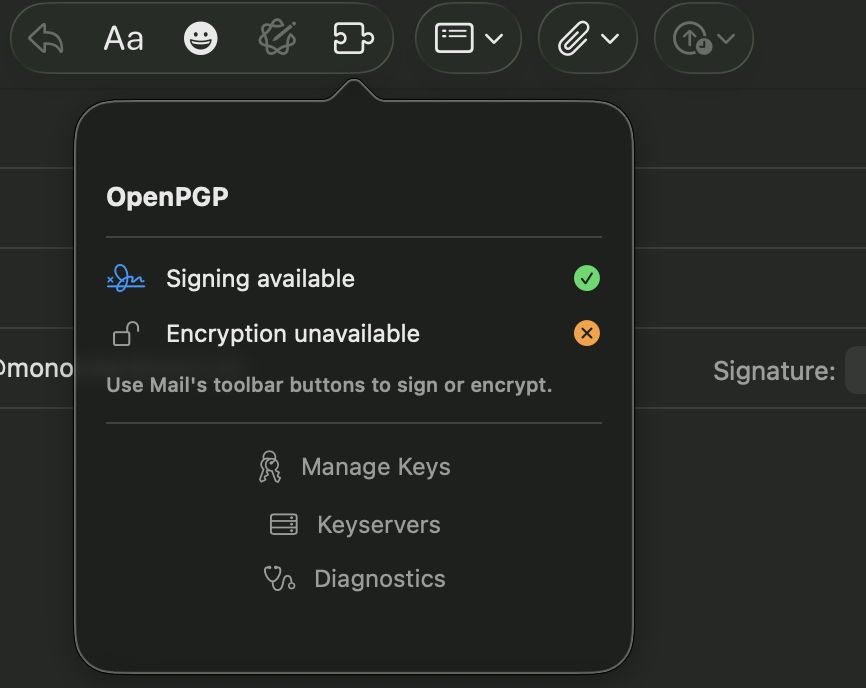
- First‑time setup: hit
Diagnosticinside the plugin, follow the guide to point it at your GPG installation. - The plugin will then use the shared keys stored in your Mac’s GPG Keychain.